Casino
  Sports
  Promos
Lucky Rollers Mobile App: It’s Features and Functions
Featuring one-tap access, the LuckyRollers App offers the same catalogue of 6,500+ games and promotions available on the desktop version. The installation part is a breeze, but since it also functions as an instant-play casino, you don’t need to download any files to get started.
How to Use the Casino LuckyRollers Application
You don’t need a dedicated Lucky Rollers App to play at the casino on your smartphone or tablet. Visiting the site from Chrome (Android) or Safari (iOS) works the same as accessing the platform from a PC, and you’ll get to try the same lineup of games, promos and banking methods. Here’s a simple breakdown of how you can use the platform on mobile phones:
- Website access – Just visit the official website and sign up to start playing.
- Web App download – You can install the progressive web App on any device.
- Native apps – I didn’t find any official LuckyRollers Casino App in Google Play or Apple App Store.
- APK Android access – There’s no APK download link on Luckyrollers, but I noticed several third-party platforms have them.
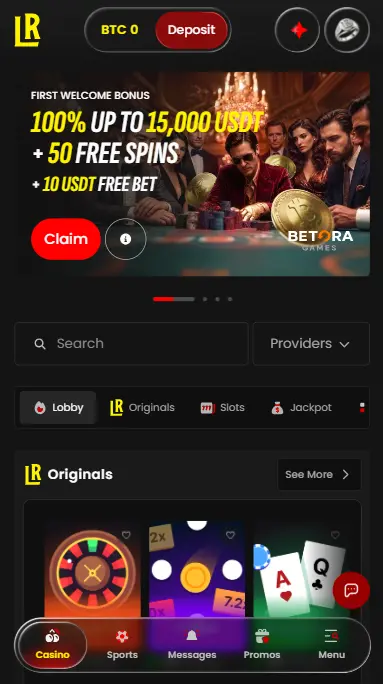
How to Use and Install on Android
The easiest way to get Casino LuckyRollers mobile App on Android is to stick to the website version. The Web App basically replaces the Google searching process by serving as a one-tap shortcut to the casino. Here is how to get the PWA version:
- Open the official website in Chrome.
- Tap the three dots on the sidebar.
- Click Add a Shortcut.
- You will now be able to open the PWA version directly from your screen.
How to Use and Install LuckyRollers Casino App on iOS
The process is fairly similar on iOS devices. Here is how you can get the LuckyRollers Online Casino mobile App PWA on your iPhone or iPad.
- Launch Safari and visit the website.
- Select the Share button at the bottom of the page.
- Find Add to Home and tap it.
- Select Add Again.
Available Devices Types
After testing the LuckyRollers NZ mobile App on every type of device, including both iOS and Android phones, desktop computer and an iPad, in every case, the full functionality of this crypto gaming site remained available.
| Device Compatibility | Desktop, smartphones, tablets |
|---|---|
| Application Types | Progressive web app |
| Free Download | Yes |
| Download Size | <1 MB |
| Download Channel | Lucky Rollers Casino’s website |
| Bonus for App Users | Up to 30,000 USDT, 100 free spins, and 10 free bets over 3 deposits |
| Mobile Games | 6,500+ |
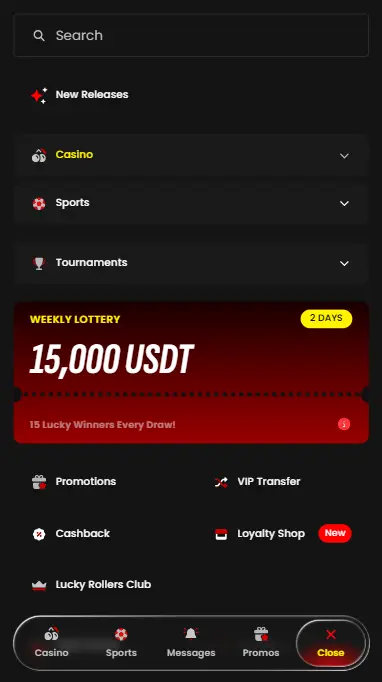
LuckyRollers Online Casino Interface
You can preview most of the features of the Lucky Roller Casino App before registering. If you visit the site now, you can still read the full T&Cs, read the rules of each promotion, check its games out and explore other verticals like live casino and sports.
However, several new buttons and sections became available after logging in for the first time. The most notable is the balance display at the centre-top – clicking your wallet lets you preview all balances you may have in different cryptocurrencies, plus there’s a quick deposit shortcut if you need to top up.
Then there’s the Rewards hub as the first icon in the top right part. You can get the 100% match bonus, 100 free spins, and a 10 USDT free bet from this window. Right next to it is the Notifications icon and your Profile menu. The latter lets you view your VIP progress and enable two-factor authentication.
Account Registration and Deposit
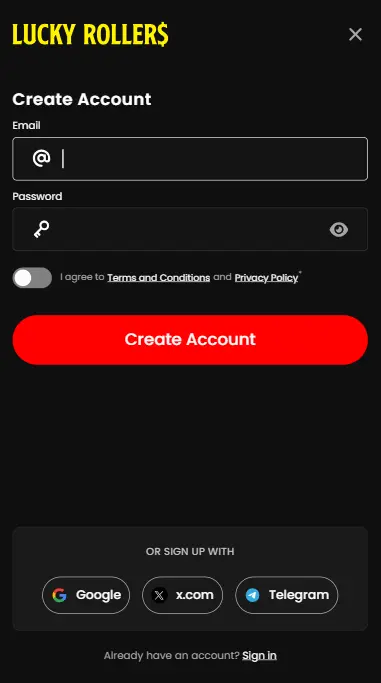
Follow the steps below to sign up for a free account once you’ve downloaded the LuckyRollers Casino Online App (or decided to use it as an instant play casino):
- Launch the app.
- Tap Sign Up.
- Enter your email address and pick your password.
- Alternatively, sign in using existing Google, X.com, or Telegram accounts.
You won’t trigger a single KYC check since joining, which makes sense since payouts are handled through crypto smart contracts.
To make a deposit through LuckyRollers New Zealand app, follow these instructions:
- Sign in to your account from any device.
- Tap the red Deposit button next to your balance.
- Select how much money you wish to load.
- Scan the QR code to go your crypto wallet.
- Meet the minimum deposit requirements.
Note that the crypto addresses and codes may change over time. Make sure to send the selected currency to the address you’ve pasted into your crypto wallet.
Benefits of App Using
To summarise the experience of using the LuckyRollers Casino mobile app, let’s highlight the main perks and disadvantages below:
| Pros | Cons |
|---|---|
| Runs smoothly on any phone, tablet, or PC without any downloads | No native applications for iOS and Android |
| Web App is lightweight and free to grab | Doesn’t have a special App bonus |
| The same catalogue of 6,500 titles is available in all formats | |
| Large welcome and reload promos with standard wagering terms | |
| Loyalty program with optional VIP transfers (from other casinos) |
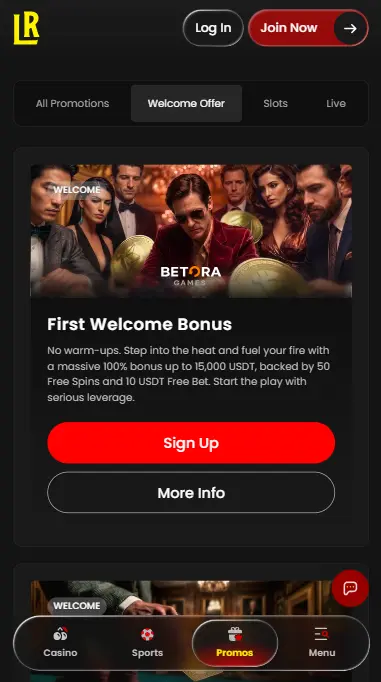
Bonuses for Lucky Rollers Casino Mobile App Players
You will be allowed to use the same promos that were available to you as a desktop user. In other words, you can claim the following promos from the Online Casino LuckyRollers app:
- Welcome bonus of up to 30,000 USDT, 100 free spins, and 10 USDT in free sports bets
- Provider-specific contests like BGaming’s Million Drops
- The Rush Hour happy hour 10 USDT bonus with lower playthrough conditions
- The Weekly 15,000 USDT lottery
- Live casino 100% bonus of up to 500 USDT
- Various VIP perks and privileges
Security and Data Protection
Whether you’re using the Online LuckyRollers Casino App PWA or accessing the site directly from a browser, you can rest assured that the platform is safe. You won’t have to disclose a single personal detail (besides my email), KYC checks aren’t necessary for withdrawals, and you’re even allowed to use a VPN if you would rather not show your actual residential IP address. For even more security, go to Profile and enable 2FA.